

DTF Labels
DTF Labels
Couldn't load pickup availability
DESCRIPTION
DESCRIPTION
Ready-to-Press
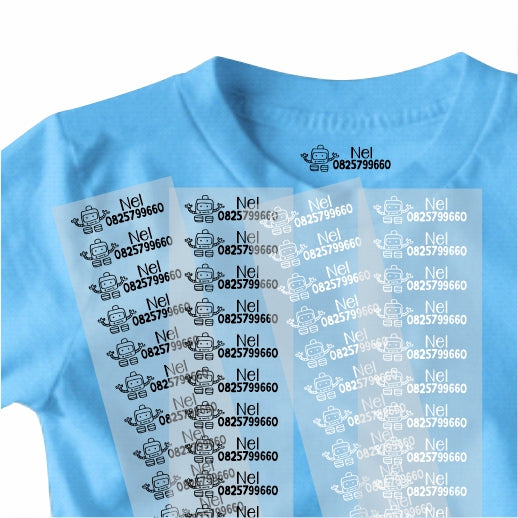
Perfect for marking light and dark clothes, as our DTF labels come pre-printed in either Black or White. Simply choose your label size, colour and quantity and you're all set.
Why choose DTF labels?
-
Quick to apply — fast setup, fast results.
-
No mess, no weeding — saves time and frustration.
-
Works on cotton, polyester, blends and many fabric types.
-
Durable, vibrant prints with a comfortable hand.
-
Great for small runs, custom gifts, and on-demand orders.
How to apply (step-by-step)
Using a heat press (recommended)
-
Preheat your heat press to medium heat (check your press manual for exact temp).
-
Pre-press the garment for 5–8 seconds to remove moisture and wrinkles.
-
Position the DTF label on the garment with the film side up (design facing the fabric).
-
Cover with a Teflon sheet or parchment paper.
-
Press for 8–15 seconds with medium pressure.
-
Carefully remove the film while warm or cold depending on the label type — follow the small peel instruction included.
-
Cover and press again for 2–3 seconds to set if desired.
Using a household iron
-
Set iron to a cotton/linen or medium setting (no steam).
-
Pre-press the garment for a few seconds.
-
Place the DTF label in position, film side up.
-
Cover with parchment paper and press firmly for 20–30 seconds, applying even pressure.
-
Peel film according to the label’s instructions (warm or cold peel).
-
Press again briefly to finish.
Care & tips
-
Wait 24 hours before the first wash if possible.
-
Wash inside out on a gentle cycle and tumble dry low or air dry for best longevity.
-
For best adhesion, use a heat press when possible.
Ready to order? Browse AFG Designs’ DTF label options or message us on WhatsApp for reseller pricing and custom sizes.

- description
- Product reviews
- F.A.Q
Ready-to-Press
Perfect for marking light and dark clothes, as our DTF labels come pre-printed in either Black or White. Simply choose your label size, colour and quantity and you're all set.
Why choose DTF labels?
-
Quick to apply — fast setup, fast results.
-
No mess, no weeding — saves time and frustration.
-
Works on cotton, polyester, blends and many fabric types.
-
Durable, vibrant prints with a comfortable hand.
-
Great for small runs, custom gifts, and on-demand orders.
How to apply (step-by-step)
Using a heat press (recommended)
-
Preheat your heat press to medium heat (check your press manual for exact temp).
-
Pre-press the garment for 5–8 seconds to remove moisture and wrinkles.
-
Position the DTF label on the garment with the film side up (design facing the fabric).
-
Cover with a Teflon sheet or parchment paper.
-
Press for 8–15 seconds with medium pressure.
-
Carefully remove the film while warm or cold depending on the label type — follow the small peel instruction included.
-
Cover and press again for 2–3 seconds to set if desired.
Using a household iron
-
Set iron to a cotton/linen or medium setting (no steam).
-
Pre-press the garment for a few seconds.
-
Place the DTF label in position, film side up.
-
Cover with parchment paper and press firmly for 20–30 seconds, applying even pressure.
-
Peel film according to the label’s instructions (warm or cold peel).
-
Press again briefly to finish.
Care & tips
-
Wait 24 hours before the first wash if possible.
-
Wash inside out on a gentle cycle and tumble dry low or air dry for best longevity.
-
For best adhesion, use a heat press when possible.
Ready to order? Browse AFG Designs’ DTF label options or message us on WhatsApp for reseller pricing and custom sizes.